
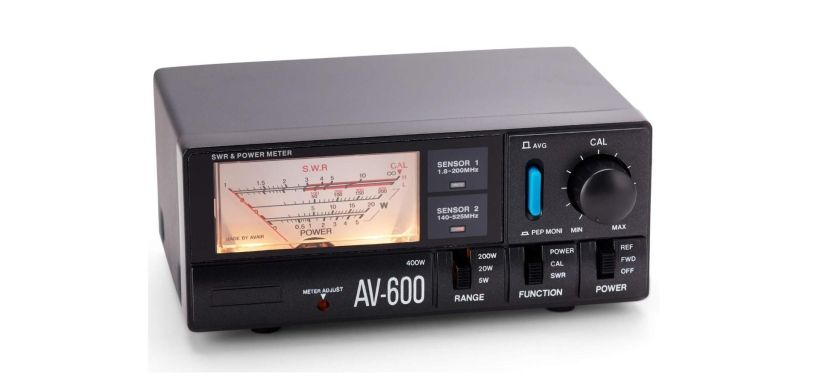
If you want to maximise your radio antenna's performance, you'll need to tune it using an appropriate SWR meter. An SWR meter helps ensure clear transmission and can even detect significant issues with your radio.
However, understanding SWR meter readings can be pretty tricky. To make life easier, we've created this neat little guide on using an SWR meter so that you can get the most out of your antenna.
Continue reading below to learn what an SWR meter is, why you need one, and how to use it correctly.
What is an SWR Meter?
The act of tuning a radio antenna is also known as adjusting the SWR (Standing Wave Ratio). An SWR meter is a device that measures the Standing Wave Ratio in your transmission line. It essentially measures the quality of the radio waves sent from the transmitter.
Since SWR typically refers to the voltage ratio, it's also known as VSWR.
The meter runs between the antenna and radio system and is typically attached using a coax cable. Some radio systems come with a built-in SWR meter for easier use. The meter helps diagnose any issues with your antenna or coax cables so that you can make appropriate adjustments.
What Is Standing-Wave Ratio?
In short, SWR measures how much output power reaches the base against how much is reflected. Obstructed output power creates standing radio waves, meaning radiating optimally. A low SWR reading means your antenna is transmitting an optimal radio frequency power.
A high SWR reading not only hinders the performance of your radio but could also potentially damage your system. That's why it's crucial to check your SWR meter before using your radio to avoid serious malfunctions. You want to ensure there isn't too much power reflected back to your transmitter.
For example, CB radios may use up to 4 watts of power. If your SWR is high and 3 watts are reflected back to your transmitter, you're only getting 25% of your maximum wattage. You can expect distorted signals and overheating in your radio system that can wreak havoc on the rest of your setup.
What Is a Bad SWR?
Now that you know what a bad SWR can do to your radio system, what exactly is a bad SWR reading? In essence, an SWR reading between 2.5-2.9 indicates problems with your signal. You might hear distorted audio or notice your transmitter heating up.
Bad SWR readings may suggest an issue with the antenna installation.
An SWR reading over 3.0 means a significant problem with your antenna or radio system needs immediate attention. Operating your radio with an SWR reading over 3.0 could lead to severe problems or malfunctions in your system.
The ideal SWR range is 1.0-1.5. If you're operating at 1.5, you know that your system is in good shape, and you'll have excellent signal quality. If you want to drop to 1.0, you may need additional tuning with your antenna. However, you may not notice an expectational difference in quality.
If you're stuck at the 1.5-1.9 range, there's no need to panic. While there is room for improvement, the SWR could be due to factors that make it impossible to get below 1.5. You'll still notice optimal performance from your radio with a 1.5-1.9 SWR reading.
Different Methods to Measure SWR
There are various methods to measure SWR.
Using a Slotted Line
Slotted lines are instruments typically used to measure microwaves. The open slot allows the probe to detect the voltage at any given point along the transmission line. As a result, you can directly compare the minimum and maximum values for an accurate measurement.
However, this method is only practical when dealing with high frequencies. Lower frequencies would be too long for optimal measurement.
Using Directional Couplers
Directional couplers measure the forward and reflected power. With this method, you have the option to make calculations in analogue or digitally. You can also read the display on your SWR meter.
How to Set Up your SWR Meter?
1) Make Sure You’re at Least 6 Meters Away From Any Structures
If you want your reading to be as accurate as possible, you need to ensure there isn't anything obstructing your signal. Buildings, trees, or other objects may prevent the signal from reaching your antenna and cause your SWR reading to be false.
Try to find an open field or parking lot to use when conducting your test. Also, make sure that there's nobody in the way if you have someone within your vicinity.
Furthermore, don't test in an enclosed area like a parking garage or basement, as the walls can distort the signals.
2) Disconnect Your Coaxial Cables and Antenna From Your Radio
You'll find both the antenna and coaxial cables connected to the back of your setup. Unscrew the cables and remove them from the ports before starting your test. Removing the antenna allows you to test the SWR directly between the antenna and the transmitter.
Some cables look similar, and mixing them up can cause malfunctions. Make sure to read through the manual so that you know which is which. You can also consider adding a label so you'll see each component's cable in the future.
3) Connect the Coaxial Cable to the Transmitter Port on the SWR Meter
Every standard SWR meter has a transmitter port either on the back or side of the device. You should notice an “XMIT” or “transmitter” marking next to the appropriate port. Connect your coaxial cable to the port and rotate it until it's firmly in place.
Some SWR meters come with built-in connecting ports. In that case, you'll need to use those. It's also important to note that some CB radio manufacturers refer to the coaxial cable as the “jumper lead”.
4) Insert the Antenna Cable into the SWR Meter
Next, you need to plug your antenna into the SWR meter. You'll see that the antenna port is marked either “antenna” or “ANT”. Insert it into the appropriate port the same way you did with the coaxial cable. Make sure that it's plugged in securely.
This stage is also a good time to double-check that you've plugged everything into the appropriate port. If not, your readings will be unreliable, and you'll need to start the test over.
5) Turn on the SWR Meter
Note: Please note that not all SWR meters require power. Basic SWR meters do not light up and do not have an on/off switch.
Find the power button on your meter and activate it. Typical meters have a power button or switch located right on the face of the device. If not, check the back or sides of the device. You should notice the meter's display light up upon activation.
Older meters come with a “Function” button, which works as a power switch. If, for some reason, you press the wrong button, turn the device on and off to restore it to its default settings.
6) Calibrate the Meter (Analogue Devices)
If you're using an analogue meter, you'll need to calibrate it manually. You can do so by turning the calibration dial. Keep turning the dial clockwise until the arrow on the display reaches all the way to the right and stops moving. Once calibrated, you can start using the meter as soon as you turn it on.
The basic CB type SWR meters will have a switch with FWD and REF. For these SWR meters put the switch to the FWD position, then key the transceiver turning the rotary controller until the needle is in the set position, then put the switch to the REF position for the SWR reading.
How to Use an SWR Meter - CB RADIO ANTENNA?
1) Put Your Radio to Channel 1
You need to set your CB radio to channel 1 before starting the test. Most CB radios have a channel dial or arrow button for channel selection.
Channel 1 is the lowest frequency channel, so this is where you'll start testing the Standing Wave Ratio.
2) Hold Down the Transmitter Button on Your Radio's Microphone
Holding down the transmitter button on the microphone is what activates the transmitter. You may hear some people say “keying the mic" for the same action. Starting the transmitter will create the signal that your meter will begin recognising. Keep the button held down throughout the reading.
Some newer meters will automatically measure the Standing Wave Ratio after you release the transmitter button on the microphone.
3) Turn the Function Switch to REF
Once you flip the function switch, you'll notice that the needle jumps to a particular value. That's the reading for the specific channel you're on and something to note. Make sure to record these values so that you can use them for future references.
4) Repeat Steps above on Channel 40
To get an accurate reading, you'll need to do the same process for channel 40 (the highest frequency on your CB radio).
Make sure to mark the value of the reading so that you can compare it to channel 1. If the readings are extremely close, you can ensure you have a stable signal. The values shouldn't be more than a few decimals away from each other.
If you want an even clearer picture of your radio's signal quality, you can also do the same on channel 20. This extra step will ensure that all your frequency ranges have a similar SWR reading.
It's also crucial to keep your microphone at the same distance from the transmitter during each channel test. If you move your mic closer when measuring for channel 40, you could end up with inconclusive results.
5) Adjust Your Radio and Antenna If Needed
If your reading isn't ideal (over 2.0), you need to adjust your antenna or other components in your setup accordingly.
Most causes are grounding issues, but there could have been a problem when installing your antenna. You can usually revert to the manual to resolve these issues.
However, you may want to take your radio to a technician to avoid further damaging your system.
How to Use an SWR Meter - HAM RADIO ANTENNA
The steps and principles above that you would use for a CB radio also apply for HAM Radio.
The primary goal in tuning your HAM antenna is to make sure it works effectively on the band(s) it is designed for.
Your HAM antenna will work best at the frequency it is designed for - as you move above or below that frequency the performance will fall off, producing standing waves. To make sure your antenna is working properly, you will want to check the SWR readings at each end of the band.
Ideally, you will want to end up with equal SWR readings at each end of the band you are tuning for. So long as the antenna's designed well, the lowest SWR will naturally occur inside the band, at the antenna's resonant frequency.
The general SWR testing procedure is set out below.
1) Tune to the low end of the band
Set your radio to CW or FM mode (not SSB).
Tune to the low edge of the band you are tuning for so that you can start testing the Standing Wave Ratio
2) Hold Down the Transmitter Button on Your Radio's Microphone
Make sure you transmit and properly calibrate your SWR meter. Once this is done transmit again and take an SWR reading. Don't forget to write it down.
3) Repeat Steps 1 and 2 above on the high end of the band
Tune to the high edge of the band you are adjusting for. Transmit and calibrate your SWR meter. Transmit and take an SWR reading. Again write it down.
4) Adjust Your Radio and Antenna If Needed
The SWR readings will tell you if the antenna is too long or too short. If the low edge has the lower SWR the antenna is too long. If the high edge reads lower the antenna is too short.
The actual adjustments you will make depend on the type of antenna you are tuning. Those with impedance matching devices are more complex than those with simple top whips.
If in doubt, talk to a radio technician to avoid damaging your system.
What Is the Typical Setup for an SWR Meter?
The placement for conventional meters is between the transmitter and antenna. You can purchase a reliable SWR meter from most radio equipment retailers, or you can build your own if you have the skills.
It's usually better to pick up a reliable meter from a store since they aren't too expensive and provide quick and accurate readings.
Conclusion
Learning to measure SWR correctly can be challenging at first, but it's a vital step to make the most out of your radio. Moreover, it could also protect your equipment in the long run. Follow the steps above to get quick and accurate readings from your SWR meter. After doing your first few tests, you should be able to conduct future tests with ease.
If your values aren't ideal, it's always a safe bet to take your radio to a qualified technician to make adjustments.
Looking for an SWR meter? Shop Moonraker today for all your CB radio needs.