
Video
Introduction
In this blog, we will explore the Moonraker Fire Spot, a revolutionary digital hotspot that is changing the game for amateur radio enthusiasts. Digital hotspots have gained popularity as they provide access to all digital modes and reflectors, even in areas without digital repeaters. While there are already many digital hotspots on the market, Moonraker has taken a unique approach with their Fire Spot. In this blog, we will delve into the features, functionality, and configuration of the Fire Spot, and why it stands out from other digital hotspots.
Unboxing the Fire Spot
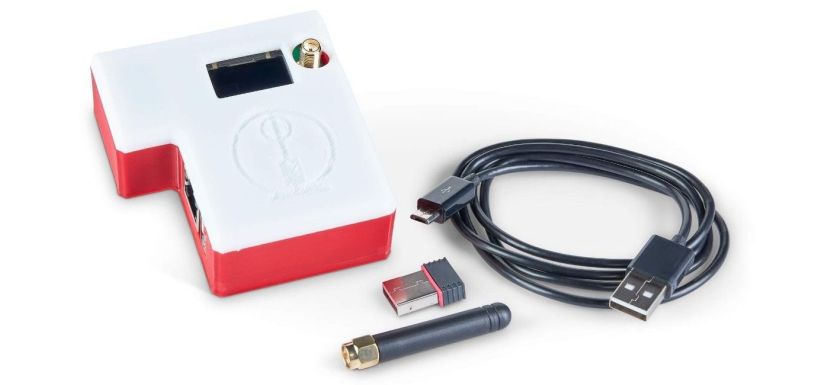
The Moonraker Fire Spot comes with a comprehensive package of essential components. Upon unboxing, you will find a USB cable for powering the Fire Spot. However, you will need to provide your own power supply, such as a mobile phone charger with a one amp rating or higher. The package also includes a UHF antenna that attaches to the SMA connector on top of the Fire Spot. This antenna supports UHF, just like the internal radio modem. Additionally, a USB Wi-Fi adapter is included, which supports both 2G and 5G Wi-Fi networks, ensuring seamless connectivity with the Fire Spot.
Designed with convenience and durability in mind, the Fire Spot comes packaged in a sturdy 3D-printed case. While the colors may vary, the overall functionality of the product remains consistent. The top of the Fire Spot features a small window, through which an OLED screen provides connection details once the device is powered up and connected to the network.
Setting Up the Fire Spot
The Fire Spot offers multiple options for connectivity, allowing users to choose between an Ethernet connection or Wi-Fi. On one side of the Fire Spot, you will find an Ethernet connection, which enables you to connect the device to your home network. Alternatively, you can use the supplied Wi-Fi adapter by plugging it into the USB port located next to the Ethernet port.
Configuring the Fire Spot is a straightforward process. To begin, attach the Ethernet cable between your home Wi-Fi router and the Fire Spot. Then, find a power supply, such as a mobile phone charger, and use the supplied USB cable to connect the power source to the Fire Spot's USB port. Next, open a browser on a computer connected to the same network as the Fire Spot and type "pi.local" into the address bar. This may take a few attempts, as the Fire Spot performs its initial boot and connects to the network. Eventually, the Pystar dashboard will load, allowing you to make the necessary changes to get the Fire Spot up and running.
If you prefer to use the Fire Spot over Wi-Fi, you can configure the Wi-Fi settings during this setup process. Simply shut down the Fire Spot using the shutdown button on the dashboard, and then insert the Wi-Fi dongle into the USB socket next to the Ethernet connection. Power on the Fire Spot while the Ethernet cable is still attached. Once booted, go to the admin page, scroll down to the bottom, and scan for available wireless networks. Enter the correct password, save and connect. After shutting down, removing the Ethernet cable, and powering back on, the Fire Spot will be accessible using Wi-Fi.
During the setup process, you will need to enter unique details, including your call sign and DMR ID. If you do not have a DMR ID, you can apply for one on the radio ID website. This ID helps with user identification on various digital networks. Additionally, you can configure other optional settings, such as radio frequency, location information, and the choice of digital modes.
Exploring Digital Modes
The Fire Spot supports various digital modes, including YSF, D-STAR, DMR, P25, and NXDN. Enabling and configuring these modes allows you to connect to different networks and communicate using the respective protocols. For example, enabling YSF mode allows you to use Yaesu's C4FM digital mode. Once enabled, you can choose which reflector the Fire Spot is connected to, such as the YSF Parrot, which plays back any transmissions it receives. This serves as a useful test to ensure your radio is set up correctly.
Changing reflectors on the Fire Spot is simple. Just select another reflector from the dropdown list, and after a few seconds, the reflector will change. You will start to hear any activity on the new reflector, if there is any. It's important to note that this blog does not cover the configuration of all digital modes in detail, as it is beyond the scope of this discussion.
DMR Configuration
DMR, or Digital Mobile Radio, is another popular digital mode supported by the Fire Spot. When setting up DMR, you have the option to choose between different servers, with Brandmeister being the most widely used. To connect to a Brandmeister server, it's advisable to create an account on the Brandmeister website. This account allows you to control your hotspot using your Brandmeister account, enabling features such as dynamic or static talk groups. Additionally, you can generate API keys and link them to your hotspot within the expert panel of Pystar.
Using DMR and Brandmeister, you can change reflectors, also known as talk groups, using your radio. It's essential to ensure that your radio is configured to the correct time slot and color code set in the hotspot. These settings are user-changeable according to your preferences and requirements.
The Fire Spot's OLED Display
One of the standout features of the Fire Spot is its small OLED display, which provides valuable information about the service it is connected to. The display shows the callsign of the current person talking, if available. This feature enhances the overall user experience, allowing for quick identification and seamless communication.
Conclusion
The Moonraker Fire Spot is a game-changer in the world of digital hotspots. With its unique features, such as support for various digital modes, easy configuration, and reliable connectivity, the Fire Spot offers an excellent alternative to traditional Raspberry Pi-based hotspots. Its use of the Orange Pi single-board computer ensures faster boot times and superior performance, elevating the overall user experience. Whether you're an amateur radio enthusiast or a professional looking for reliable digital connectivity, the Moonraker Fire Spot is worth considering.
Thank you for reading this blog post! We hope you found it informative and useful. If you have any questions or comments, please feel free to leave them below. Until next time, take care, stay safe, and happy communicating!